backgroundbackgroundbackgroundbackgroundbackgroundbackgroundbackgroundbackgroundbackgroundbackgroundbackgroundbackgroundbackgroundbackgroundbackground

Unlimited Add-ons.
One Subscription.

Over $1750+ of payware MSFS add-ons. One affordable subscription.

Free account, no credit card required.

131Payware Add-ons
$1750+Total Value
117Free Add-ons

Stop Browsing. Start Flying.

No more agonizing over which add-ons are worth owning.

The Old Way

  • $10-30 per add-on
  • Research and deliberate every purchase
  • You may not fly there enough

SimAtlas Free

  • Access free add-ons forever
  • One-click install and updates
  • No credit card required
GET STARTED FREE

With SimAtlas+

  • Large library of premium add-ons
  • Single click to enable any add-on
  • Discover new favorites

Click to view pricing details →

Create free account

Free to start, no credit card required.

Recently Added

Hangzhou Xiaoshan Airport & City screenshot19
MSFS 2020MSFS 2024

Hangzhou Xiaoshan Airport & City

SamScene3D

Zhejiang Province, China

Sitia Airport screenshot30
MSFS 2020MSFS 2024

Sitia Airport

MM Simulations

Crete, Greece

Volkel Airbase screenshot
MSFS 2020MSFS 2024

Volkel Airbase

DignomDesign

Noord-Brabant, Netherlands

Gilze-Rijen Airbase screenshot
MSFS 2020MSFS 2024

Gilze-Rijen Airbase

DignomDesign

Noord-Brabant, Netherlands

Pemberton Airport screenshot
MSFS 2020MSFS 2024

Pemberton Airport

dvlcreations

New Jersey, United States

Explore Our Collection

An interactive map showing available airport and scenery add-ons is displayed here. Visit our packages list for a text-based list of all available add-ons.

Free add-ons are available to everyone. No subscription required.

Sultan Abdul Halim Airport screenshot16
MSFS 2020MSFS 2024

Sultan Abdul Halim Airport

Shadescene

Kedah, Malaysia

Senai International Airport screenshot25
MSFS 2020MSFS 2024

Senai International Airport

Shadescene

Johor, Malaysia

Labuan Airport screenshot13
MSFS 2020MSFS 2024

Labuan Airport

Shadescene

Labuan, Malaysia

Langkawi International Airport screenshot25
MSFS 2020MSFS 2024

Langkawi International Airport

Shadescene

Kedah, Malaysia

Penang International Airport screenshot17
MSFS 2020MSFS 2024

Penang International Airport

Shadescene

Penang, Malaysia

Kuala Lumpur-Sultan Abdul Aziz Shah screenshot13
MSFS 2020MSFS 2024

Kuala Lumpur-Sultan Abdul Aziz Shah

Shadescene

Selangor, Malaysia

Terengganu Airport screenshot13
MSFS 2020MSFS 2024

Terengganu Airport

Shadescene

Terengganu, Malaysia

Nuuk Airport screenshot45
MSFS 2020MSFS 2024

Nuuk Airport

MM Simulations

Sermersooq Municipality, Greenland

Vestmannaeyjar Airport screenshot22
MSFS 2020MSFS 2024

Vestmannaeyjar Airport

MM Simulations

Southern Region, Iceland

Priština Adem Jashari International Airport screenshot38
MSFS 2020MSFS 2024

Priština Adem Jashari International Airport

MM Simulations

Pristina District, Kosovo

Liège Airport screenshot40
MSFS 2020MSFS 2024

Liège Airport

MM Simulations

Liège Province, Belgium

Münster Osnabrück Airport screenshot21
MSFS 2020MSFS 2024

Münster Osnabrück Airport

MM Simulations

North Rhine-Westphalia, Germany

Ivalo Airport screenshot24
MSFS 2020

Ivalo Airport

MM Simulations

Lapland Region, Finland

Oulu Airport screenshot27
MSFS 2020MSFS 2024

Oulu Airport

MM Simulations

North Ostrobothnia Region, Finland

Emden Airport screenshot7
MSFS 2020

Emden Airport

MM Simulations

Lower Saxony, Germany

Borkum Airport screenshot18
MSFS 2020

Borkum Airport

MM Simulations

Lower Saxony, Germany

Bayreuth Airport screenshot16
MSFS 2020

Bayreuth Airport

MM Simulations

Bavaria, Germany

Turku Airport screenshot31
MSFS 2020MSFS 2024

Turku Airport

MM Simulations

Southwest Finland Region, Finland

Tromsø Airport screenshot22
MSFS 2020MSFS 2024

Tromsø Airport

MM Simulations

Troms, Norway

Stockholm Skavsta Airport screenshot15
MSFS 2020

Stockholm Skavsta Airport

MM Simulations

Södermanlands län, Sweden

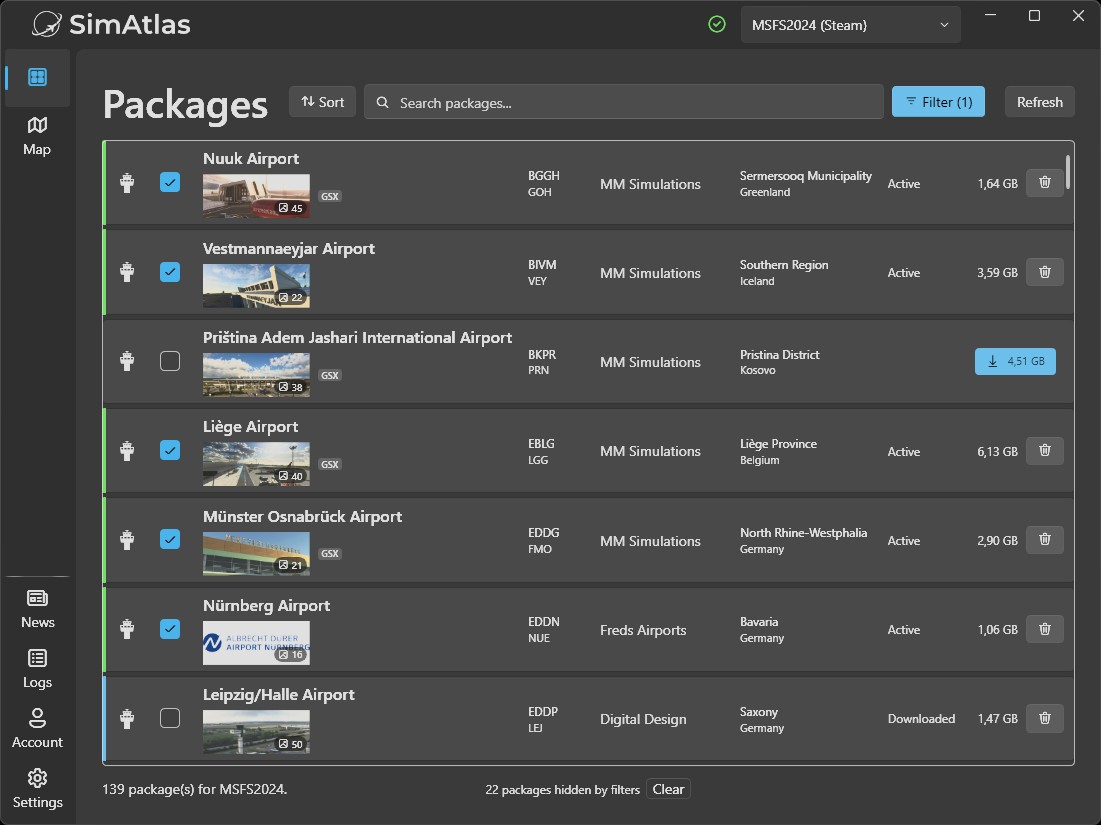
One click. Done.

SimAtlas desktop app showing the package library

Meet the all-new SimAtlas client, rebuilt from the ground up for speed and stability.

Support the creators

Every subscription flows directly to the talented developers building these add-ons. Subscribe, fly, and keep great scenery coming.

How It Works

Step 1: Create account

Get instant access to free add-ons.

  • Permanent free access
  • No credit card required

Step 2: Install our client

One-Click install.

  • Runs quietly in background
  • No configuration needed

Step 3: Browse & Enable

Explore the library. Click to enable the add-ons you want.

  • One-click enable
  • Add-ons download automatically before you fly

Step 4: Fly

Launch MSFS.

  • Your enabled add-ons are downloaded and ready to explore
  • No waiting or streaming mid-flight

Built on Technology You Can Trust

Your add-ons are delivered securely through filesystem technology from Callback Technologies, a toolkit trusted by Fortune 500 companies for over two decades.

Microsoft-signed

Validated and recognized by Windows, so you always know what you are installing.

No internet access

It only delivers your packages locally. It never phones home.

Uninstall anytime

Runs quietly in the background and is fully removable whenever you choose.

Ready to get started?

Create your free account and start flying today. No credit card required.

Frequently Asked Questions

What is SimAtlas?
SimAtlas is a subscription service for payware Microsoft Flight Simulator add-ons. We built SimAtlas because as simmers ourselves, we were spending way too much time discovering all the amazing add-ons out there, deliberating whether to buy them, and then keeping them updated. We thought there has to be a better and more affordable way to help simmers experience the wide array of great add-ons that exist, and for developers to maximize both their revenue and the number of users who get to enjoy their creations.

Are there free add-ons available?
Yes! Free add-ons in our library are available to everyone - no subscription required. Browse our collection to see what's available for free.

Which simulators are supported?
  • Microsoft Flight Simulator 2020 (MSFS 2020)
  • Microsoft Flight Simulator 2024 (MSFS 2024)

Can I use other addons?
Sure! Your existing add-ons will continue working just fine.

Does SimAtlas work with FSLTL, AI Traffic, and GSX?
Yes! FSLTL, AI Traffic, and GSX are all fully supported. GSX profiles for included sceneries can be installed automatically through the SimAtlas client.

Are there any known limitations?
  • SimAtlas does not work when MSFS is running in admin mode or developer mode
  • Some tools that read the Community folder directly (e.g., LittleNavMap) may not work correctly with SimAtlas add-ons

What happens if I cancel?
To ensure developers get fairly rewarded, we implement content protection so that only active subscribers can use the included add-ons. After your subscription expires, you will lose access to the included paid add-ons.

What does the SimAtlas client do?
The SimAtlas client securely installs, updates, and manages all add-ons—no manual ZIP files or Community‑folder work. Make sure to open the client before you start MSFS and keep it open for the duration of the MSFS session, else included add-ons will not work.

Does SimAtlas install a driver?

Yes. SimAtlas installs a copy-protection driver to securely deliver your simulator packages. It is developed by Callback Technologies, whose filesystem components have been trusted by Fortune 500 companies for over two decades.

  • Microsoft-signed and recognized by Windows
  • Does not access the internet
  • Can be uninstalled at any time

How does SimAtlas handle add-on updates?
When developers release updates, SimAtlas intelligently downloads only the changed files—not the entire add-on. This means faster updates and less bandwidth usage, keeping your add-ons current with minimal wait time.

Do I need a fast internet connection?
Enabled add-ons are downloaded in advance, so they are ready on your disk before you launch MSFS.

How much disk space do I need?

Each add-on ranges from a few MB to several GB. We recommend at least 50GB of free space.

Downloaded scenery stays on your disk (even when disabled) so you can re-enable airports instantly without re-downloading. You can manually remove scenery anytime through the client if you need to free up space.


How does SimAtlas work with developers?
We license add-ons directly from developers and they receive a significant majority of all subscription revenue we collect. In return, our subscribers get access to their commercial work. It's a win-win that supports the flight sim creator community.

Does SimAtlas work offline?
Once your enabled add-ons have finished downloading, the scenery data stays on your disk. You will still need internet access to launch SimAtlas, but the amount of data exchanged at launch is minimal.

Does SimAtlas affect my loading times / fps?

SimAtlas works just like any other addon - the more scenery you have enabled, the longer MSFS takes to load. However, there is no additional performance impact from SimAtlas itself, only from the scenery you choose to enable.

The good news: Enabling and disabling sceneries with SimAtlas is incredibly easy. We recommend enabling only the airports you're actively flying to keep loading times fast. You can enable/disable sceneries anytime with one click - no file management needed.

FPS Impact: SimAtlas adds almost no observable FPS overhead. Any FPS impact comes purely from the scenery itself, exactly as if you'd installed it manually.


How do I cancel my subscription?
We bill monthly with no contracts or commitments. Cancel anytime from your account dashboard—no questions asked, no hoops to jump through. You'll keep access until your current billing period ends.

Can I use SimAtlas on multiple PCs?
Yes! Your subscription works on any PC where you're signed in. Just install the client on each device. A single account cannot be used simultaneously on multiple machines.

Does it work on XBox / Playstation?
No, it's for PC only.

How do I install SimAtlas?
Download our lightweight client, run the installer, and you're done. The client runs in the background and handles everything automatically.