150+ payware add-ons. One subscription.
- MSFS 2020 & 2024
- Cancel anytime

Add-ons from developers like











What's new
Explore the collection
Every pin is an add-on. Free add-ons are open to everyone, no subscription needed.
An interactive map of available airport and scenery add-ons loads here. Visit our packages list for a text-based list of all available add-ons.


Why subscribe instead of buying
No more agonizing over which add-ons are worth owning.
The Old Way
- US$10-30 per add-on
- Research and deliberate every purchase
- You may not fly there enough
SimAtlas Free
- Access free add-ons forever
- One-click install and updates
- No credit card required
With SimAtlas+
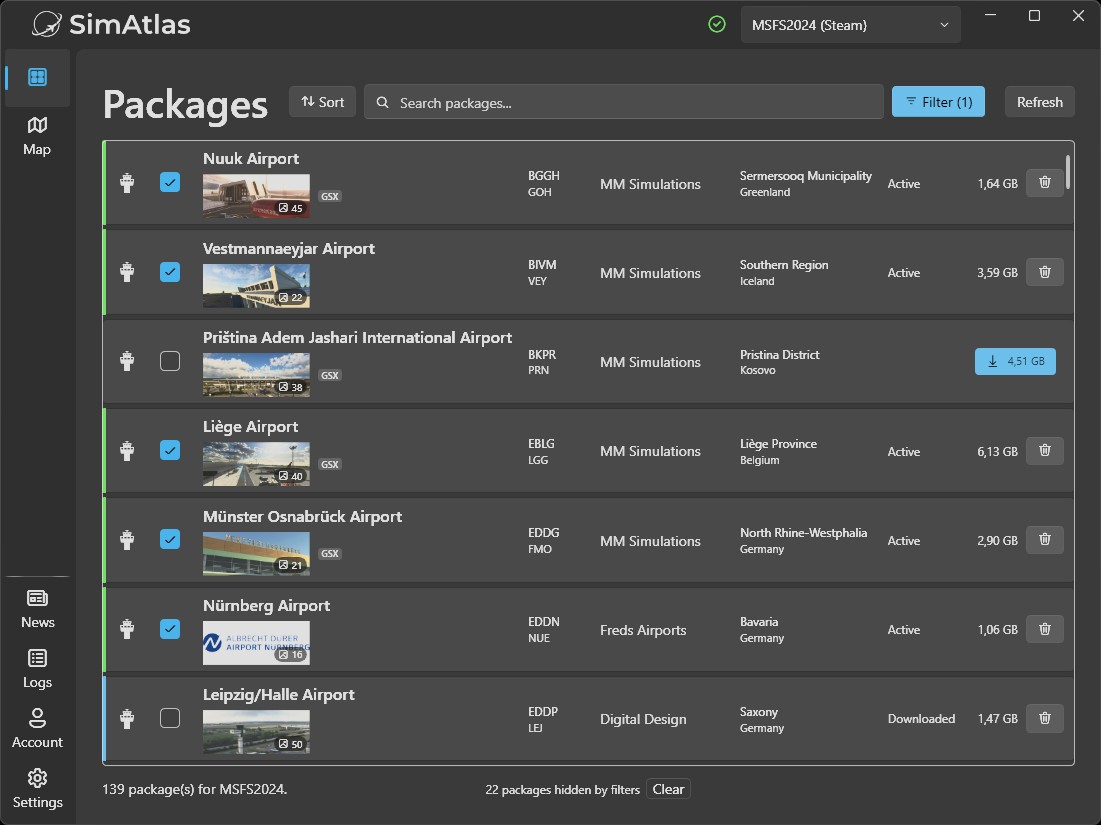
- Large library of payware add-ons
- Single click to enable any add-on
- Discover new favorites
Free to start, no credit card required.
Enable add-ons with one click
Create a free account
No credit card needed. Free add-ons are included.
Install the client
It runs quietly in the background. Nothing to configure.
Enable add-ons and fly
Enabled add-ons download before you launch MSFS, so nothing streams mid-flight.
Built on proven technology
Your add-ons are delivered securely through filesystem technology from Callback Technologies, a toolkit trusted by Fortune 500 companies for over two decades.
Microsoft-signed
Validated and recognized by Windows, so you always know what you are installing.
Private by design
The part that delivers your add-ons works only on your PC. It never connects to the internet.
Uninstall anytime
Runs quietly in the background and is fully removable whenever you choose.
Support the creators
Every subscription flows directly to the developers building these add-ons. Subscribe, fly, and keep great scenery coming.

Ready to get started?
Create your free account and start flying today. No credit card required.
Frequently asked questions
Getting started
What is SimAtlas?
What is included in SimAtlas+?
Is SimAtlas cheaper than buying add-ons?
If you fly to many different airports, usually yes: one subscription covers the whole payware library. If you only fly one or two airports and want to keep them forever, buying those add-ons can work out better.
Are there free add-ons available?
How do I install SimAtlas?
What does the SimAtlas client do?
How does SimAtlas work with developers?
Compatibility
Which simulators are supported?
- Microsoft Flight Simulator 2020 (MSFS 2020)
- Microsoft Flight Simulator 2024 (MSFS 2024)
Does it work on Xbox / PlayStation?
Can I use other add-ons?
Does SimAtlas work with FSLTL, AI Traffic, and GSX?
Are there any known limitations?
- SimAtlas does not work when MSFS is running in admin mode or developer mode
- Some tools that read the Community folder directly (e.g., LittleNavMap) may not work correctly with SimAtlas add-ons
Performance and technical
Does SimAtlas affect my loading times / fps?
SimAtlas works just like any other add-on. The more scenery you have enabled, the longer MSFS takes to load. However, there is no additional performance impact from SimAtlas itself, only from the scenery you choose to enable.
The good news: Enabling and disabling sceneries with SimAtlas is incredibly easy. We recommend enabling only the airports you're actively flying to keep loading times fast. You can enable/disable sceneries anytime with one click. No file management needed.
FPS Impact: SimAtlas adds almost no observable FPS overhead. Any FPS impact comes purely from the scenery itself, exactly as if you'd installed it manually.
How much disk space do I need?
Each add-on ranges from a few MB to several GB. We recommend at least 50 GB of free space.
Downloaded scenery stays on your disk (even when disabled) so you can re-enable airports instantly without re-downloading. You can manually remove scenery anytime through the client if you need to free up space.
Do I need a fast internet connection?
Does SimAtlas work offline?
How does SimAtlas handle add-on updates?
Does SimAtlas install a driver?
Yes. SimAtlas installs a copy-protection driver to securely deliver your simulator packages. It is developed by Callback Technologies, whose filesystem components have been trusted by Fortune 500 companies for over two decades.
- Microsoft-signed and recognized by Windows
- Does not access the internet
- Can be uninstalled at any time
Billing and account
How do I cancel my subscription?
What happens if I cancel?
Can I get a refund?
Subscription fees are generally non-refundable, except for persistent technical issues our support cannot fix, duplicate charges, or unauthorized transactions. Full details are in our refund policy.